Article
How I Work with AI

The kind of workflow I prefer
Everyone has their own preferences and ways of processing ideas, putting them into practice and evaluating the results. In my view, agentic software development amplifies those differences. Some people like to keep their options open as they move on to new tasks. Others prefer to keep the roadmap in view and make decisions days or even weeks ahead.
I belong to the second group: I like to plan, stay organised and think ahead.
In an ideal working day, I would not focus on what gets produced today, but on what will be ready next week and on the work I am setting aside or organising for the weeks and months ahead. In reality, bugs crop up, urgent changes land at short notice and, above all, I have to review the work done the previous day. So, quite deliberately, I am still a bottleneck.
From an idea to a plan
A few months ago, I found myself wondering: if I do very little coding and spend my time writing down what needs doing, explaining how it should be done and checking the result, how can I add value and make good use of my time while AI agents are working? I do not mean sitting at my computer, watching files write themselves while I run several agents in parallel. I wanted to go further: define the work, take my son to the park, and have everything I asked for installed on my iPhone — or Mac — the next morning.
I started with almost analogue solutions: writing requests in Notes on my iPhone or Mac and asking an agent with remote access to read and carry them out. Yes, I could make requests from my phone and come back to a few closed pull requests in the evening (not all of them, but I will get to that). I worked from specifications, not just one-off requests — I was not aiming for vibe coding — and those specifications were integrated into the repository. Everything was written down, which was essential for giving the agents context.
But it did not scale. Running several agents in parallel was chaotic: they duplicated tasks or implemented the same thing twice; dependencies between tasks added token overhead; and, worst of all, with so many trees I could no longer see the forest. I was starting to feel anxious about losing control, reviewing so many changes and having to put everything back in order.
To address this, I added skills that made agents check the outstanding work before starting implementation. I got them to “talk” to one another through files, but each agent had its own branch and worktree. The main branch was constantly receiving changes that needed integrating, and there was no guarantee they would land in time for another agent to have the latest information. There were fewer problems, but the problems were still there. So, in a practical exercise in deliberate clumsiness, I moved the synchronisation files out of Git so the agents could use them freely, without commits or merges. Not versioning them, not being able to see them on GitHub and having no real oversight of what was going on were already good reasons to rule out that way of working. But I only started looking for something better when I hit a brick wall: I could not coordinate agents working on different computers.
That was when I thought about building a simple piece of software to do the same thing, but through a network interface.
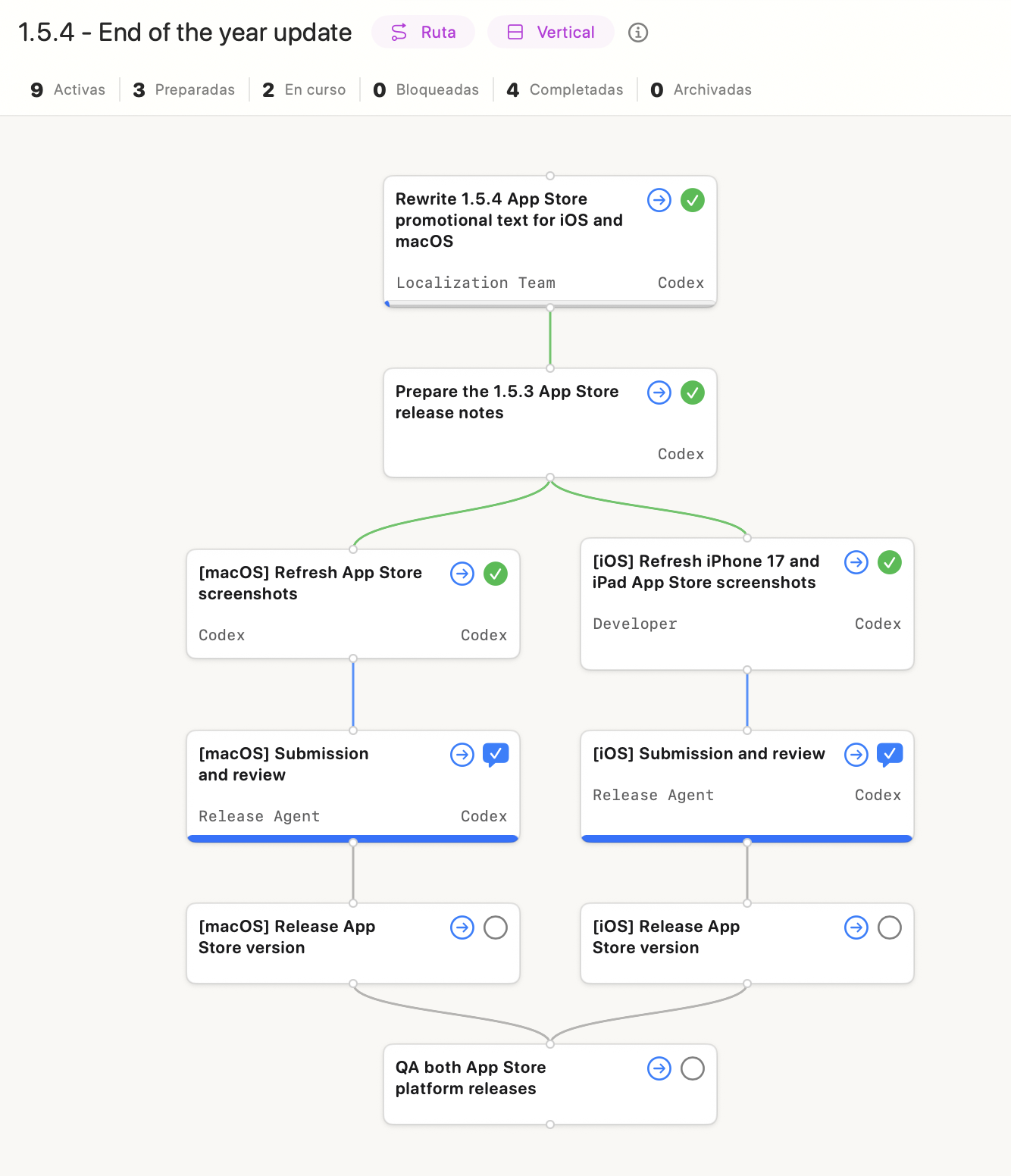
The Ecelyo app
The initial idea was simple: record tasks from anywhere and in any way — with AI or by typing them myself — then make them available through an MCP and a user interface. Agents could check and update task statuses from any computer in my home, while I could see at a glance what was happening and which agent was working on each task. That is especially useful when you have scheduled tasks; I will come back to those later.
The Ecelyo app is more capable now and has grown more sophisticated as I have needed it to. In fact, the app uses itself to keep track of the improvements planned for its next versions.
Without going into too much detail, the app has a structure built around:
- System: the deliverable.
- Project: a group of related work.
- Tactic: the main unit of work. It contains tasks with a shared goal and a release version assigned in advance.
- Task: a description, status, AI agent working on it, URLs, rendered previews and more.
- Acceptance criteria: part of each task. They help agents reduce the review burden by checking that the work is complete before moving on. In some systems, they are similar to subtasks.

In other words, Ecelyo does not just collect tasks; it organises them into a hierarchy so I can work on different areas — or put them off — depending on what is needed and how much work is already in progress.
My current workflow
I am an app developer, so my workflow is shaped by that, although I think it can be applied to other kinds of work too.
I divide my workflow into these stages:
-
- Task intake: gathering requirements and recording tasks in Ecelyo. AI agents connected to Ecelyo handle this process, using specialised skills to structure the work in a consistent way. I often have an idea when I am away from my computer, ask Codex to record it, discuss it and ask me questions, then put my phone back in my pocket knowing the idea is saved and organised for a future release. I will explain how Ecelyo organises work and its methodology in another article.
-
- Scheduled execution: at set intervals, a process works on a particular type of task in a specific project. Tasks can be:
- Maintenance: only bug fixes and urgent changes are implemented.
- Current version implementation: tasks for features I want to release soon are implemented.
- Evaluation: audits of the codebase, good practices, accessibility and security. These run less often and only create intake work (the previous stage) for later implementation in stage two. For these, I use models such as Opus or Sol.
-
- Review: every day, a build of the alpha version is deployed to my test environment from the main branch. I then install it on my phone, computer and tablet. This alpha uses the production environment and is the version I use myself (I do not download it from the official store or use development environments). That way, I experience real problems before users do. This step also generates more intake work.
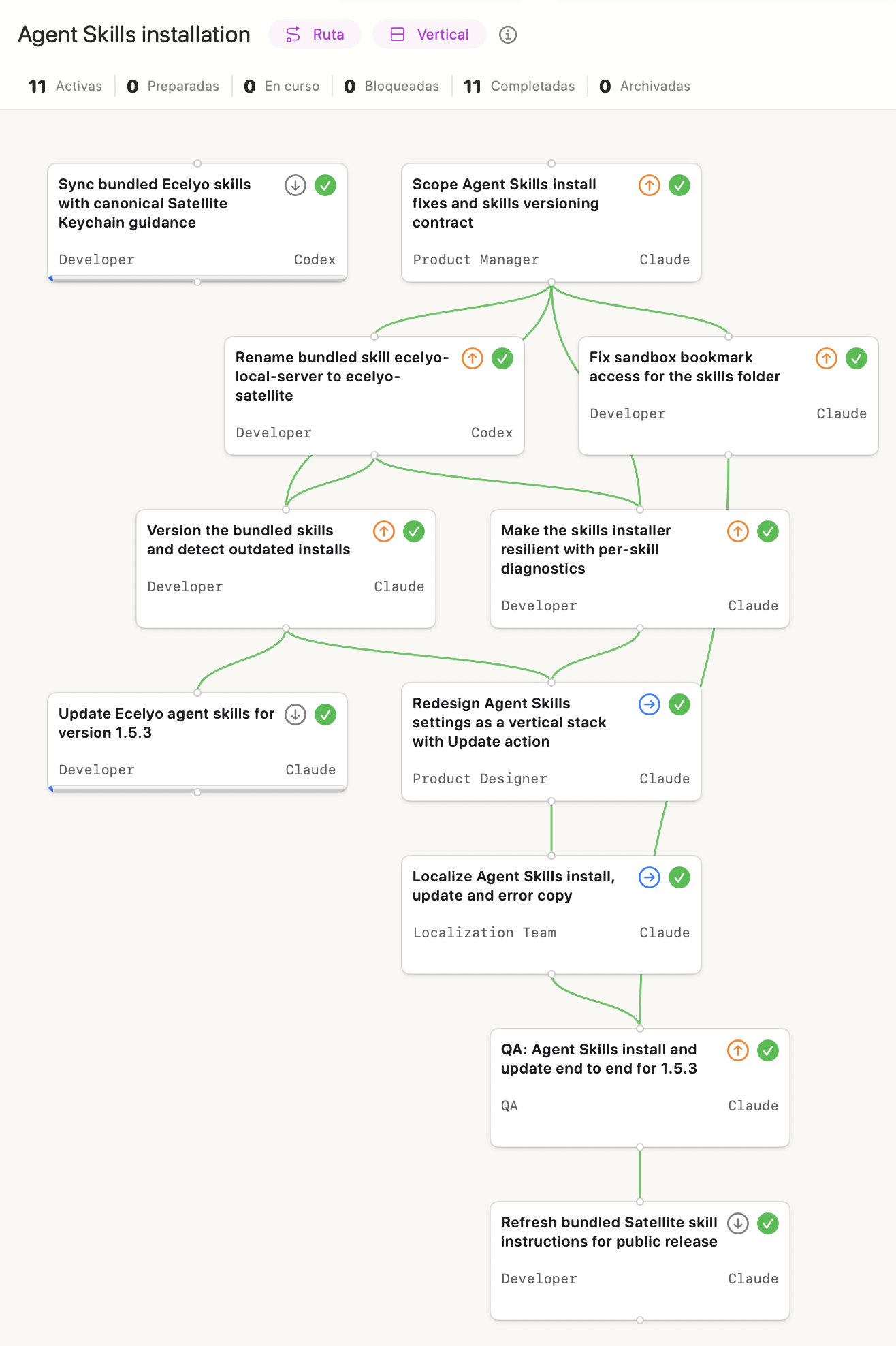
All of these runs take task priority and complexity into account. I am using “task” as shorthand, although in Ecelyo the closest equivalent to a unit of work is a “tactic”. By “complexity”, I mean how many related tasks there are, their dependencies and how ambiguous they are. More ambiguity can mean more questions for the user, and therefore lower urgency.
What day-to-day work actually looks like
I cannot say exactly when I do each thing, but I can describe what I do when I have time and what the AI does while I am otherwise occupied — or reviewing and recording more work.
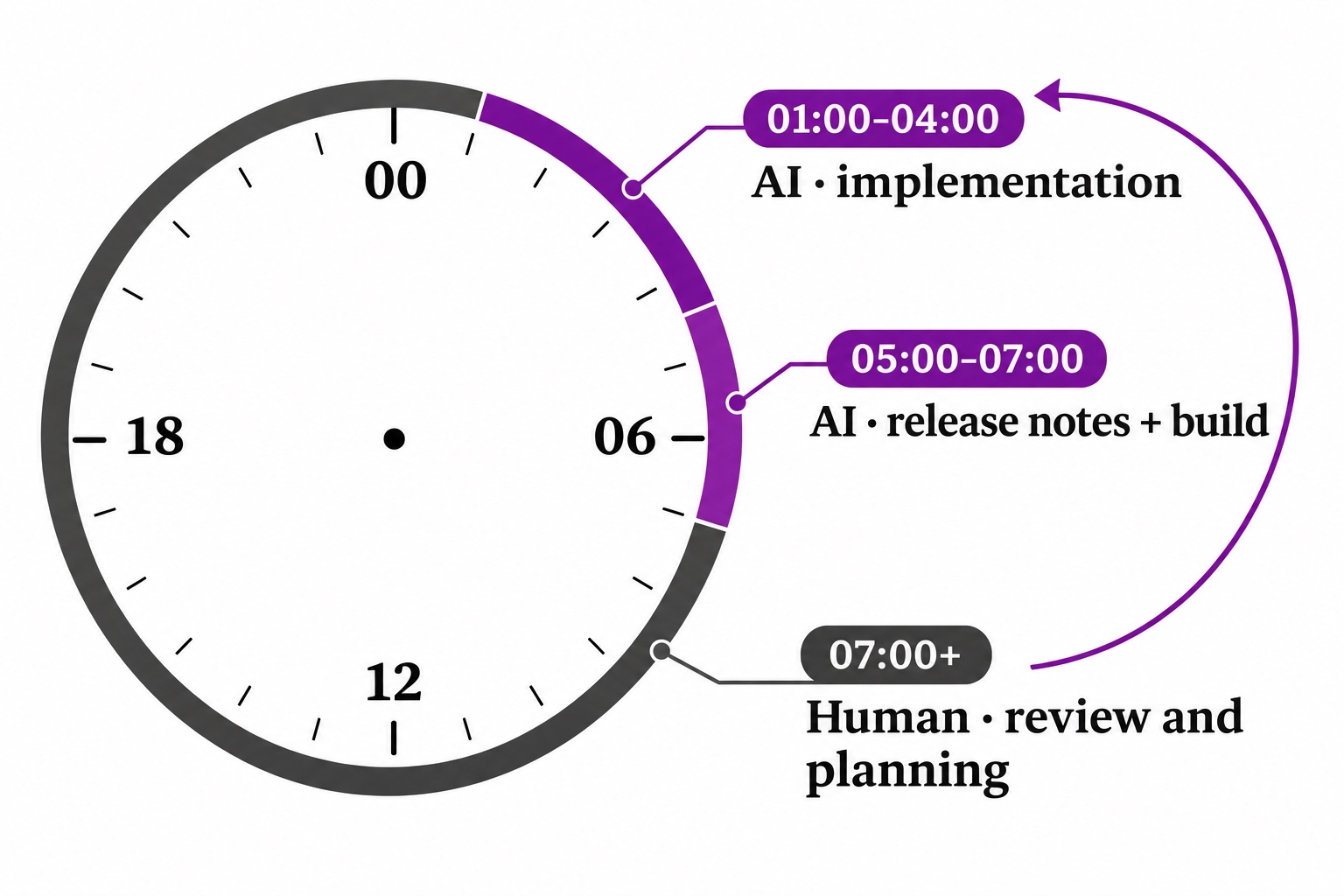
- 🌖 Night (1 am to 4 am):
- Codex (Luna): implements two tasks from a tactic, one after another.
- Claude (Sonnet): implements two tasks, in much the same way as Codex.
- Antigravity (Neon): handles two maintenance tasks. There is always a project with maintenance tactics.
- 🌄 Early morning (5 am to 7 am):
- Codex (Luna): generates release notes for the latest changes.
- CI/CD: builds the alpha version with the latest release notes.
- 🌇 Morning (from 7 am):
- I download the app to my devices.
- I review the work in Ecelyo and decide what to reprioritise, finish straight away or validate before marking a tactic complete.
- I review the work for bugs and record any I find.
- I add new tasks to improve the product based on using the app as part of my daily routine.
- I often ask an agent to finish or refine a tactic at this point.
As you can see, 90% of the work happens in the first hour of the morning. To be fair, I can fit that block in at any time of day, even when I am away from home, thanks to remote access to the agents and Ecelyo syncing across my devices through iCloud.
A brief conclusion
In reality, I still spend considerably more time than I would like sitting at my computer, correcting the AI, unblocking it or simply answering its questions. It is also true that work which would have taken me a week three years ago can now be planned and left to run — and an AI will usually finish it in a day.
Yes, I spend a lot of time at my computer, but my productivity has also increased by more than 300%.
Ecelyo has become my task manager. Whether I am taking courses, developing apps or writing articles, I always have a clear picture of what I have done and what is left to do. Most of it is handled by scheduled agents and skills I have tailored to my needs.
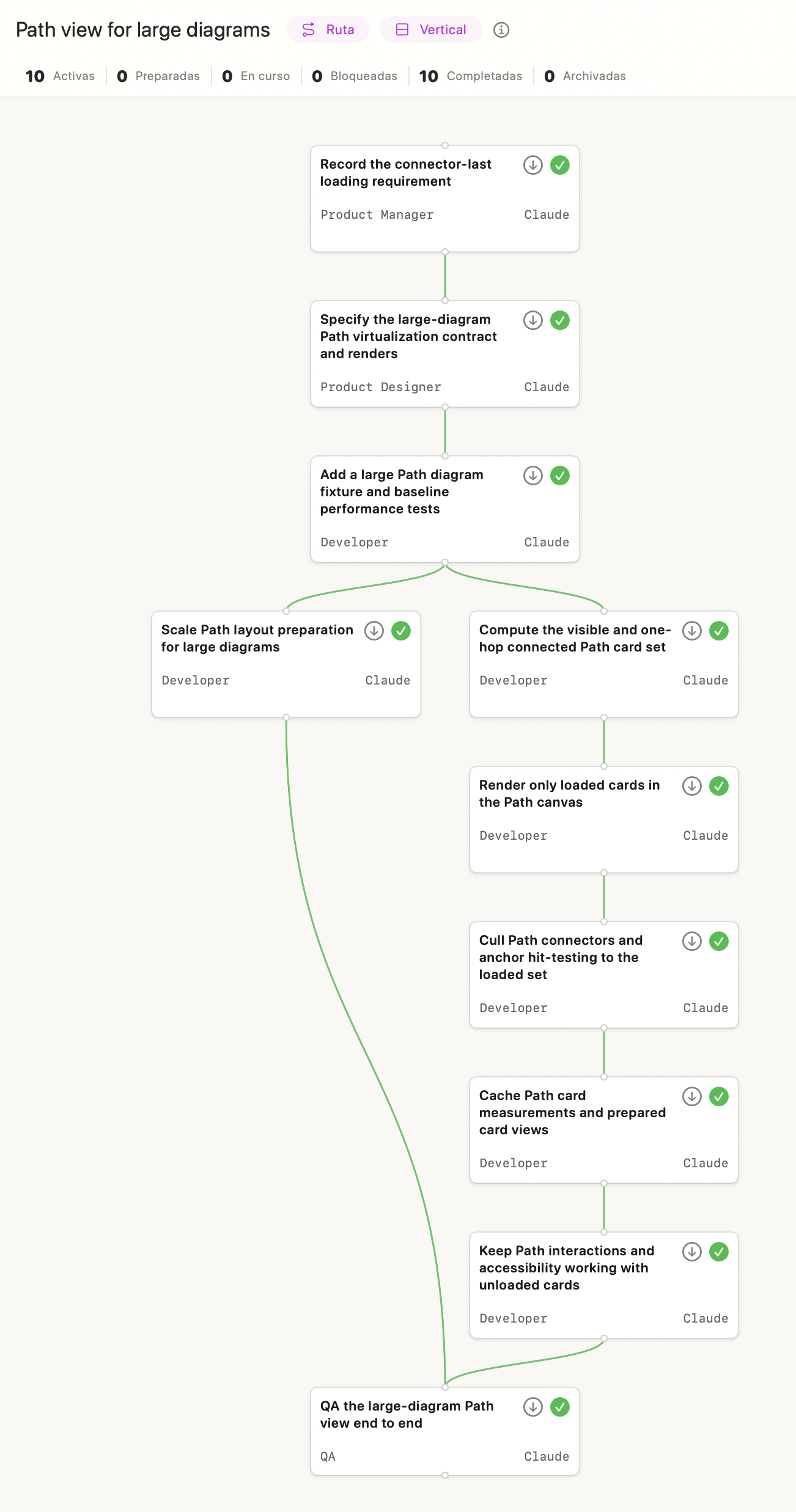
Give it a try! It is a free app available on the App Store (there is no web version). You can install it here. If you have an iPhone or a Mac, give it a go and let me know what you think. Even if it is not for you, I would love to hear your thoughts.
In another article, I will explain how Ecelyo organises work and the methodology behind it.